DIV widths
One of the things that's been most frustrating developing websites like Quisition, habitualist and the new Cats or Dogs is the difference between Firefox and Safari (and I guess IE) in determining the width of a block.
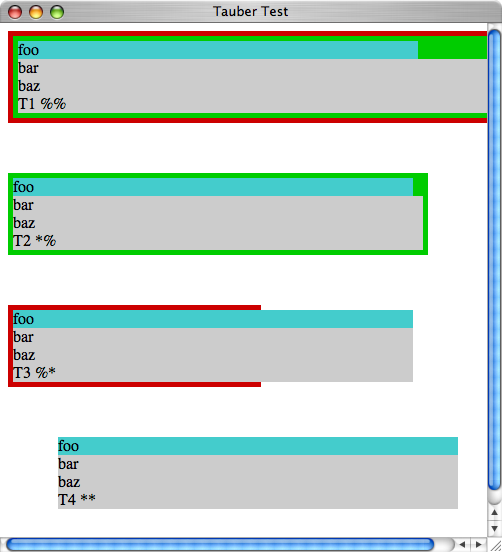
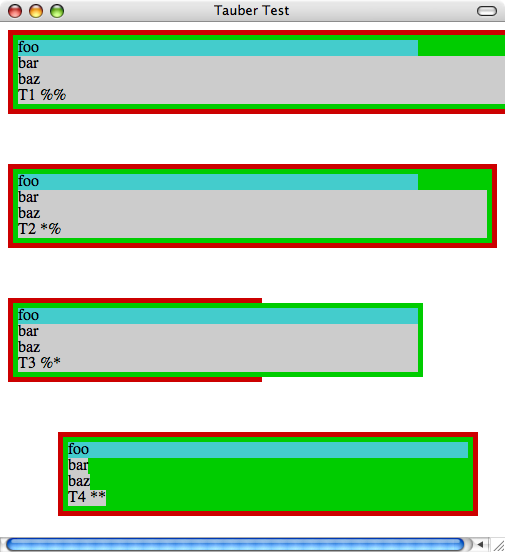
Firefox only makes a div as wide as the content needs to be (plus any padding). Safari makes the div as wide as the parent div (minus the parent's padding and the div's own margins).
In different situations, both approaches are desirable.
Short of fixing the width (which does give the same behaviour on both Firefox and Safari) how does one (with CSS) make Firefox behave like Safari or Safari behave like Firefox?
UPDATE: Okay, debugging 101: find the smallest thing that reproduces the problem. It turns out to have to do with multiple embedded floats. The following behaves differently in Firefox and Safari:
<div style="float: left;"> <div style="float: left;"> <div style="width: 400px;">foo</div> <div style="background: #CCC;">bar</div> </div> </div>
In Firefox, bar's background is only as big as the text. In Safari it extends 400px.
UPDATE (2007-09-19): Courtesy of William Bardon, now see http://jtauber.com/2007/09/div_test.html
A screen shot of that, with the window narrow enough that the third test isn't on the same line as the second is at http://jtauber.com/2007/09/tauber_bardon_test_safari.png
The same thing in Firefox can be seen at http://jtauber.com/2007/09/tauber_bardon_test_firefox.png
Comments (11)
James Tauber on Sept. 16, 2007:
I've heard of stylesheet resets but have never tried one. Sounds like a good place to start. Thanks!
PT Sefton on Sept. 16, 2007:
I confess that I have not done hands-on web layout for a while now, but last time I tried to do layout with DIV+CSS I gave up in disgust.
Use tables, they're better supported by browsers and they are much easier for designers to handle because there is much less needles indirection. How many of us need a layout mechanism that lets you place content in arbitrary places, even over the top of other content? Tables are an unambiguous way of dividing up a screen without worrying about that kind of issue.
I know that tables are supposed to be bad because they hurt accessibility, but why aren't there flags that say "This table is for layout only" and to control the order cells might be rendered.
I reckon the whole extreme CSS layout thing is promoted mainly by people who make their living from being the only ones who can do it.
Al on Sept. 16, 2007:
James,
I think something else is amiss (the div has display:inline set) if Firefox is only making the div as wide as the content. By default, a div is a block level element which essentially means that it interrupts the flow of content and their default behaviour is to take up as much horizontal space as is available (ie, it automatically goes to 100% of its parent element).
Al.
James Tauber on Sept. 16, 2007:
Al, you could be right. A div by itself works in Firefox like Safari. It in just within the context of some of my sites that it doesn't. I need to work out what characteristic specific to the context is causing it.
Asbjørn Ulsberg on Sept. 17, 2007:
Whatever you do, don't listen to "PT Sefton"'s terrible advice! :-) When it comes to this particular problem, I'd like to see a test case in the form of an actual HTML document residing on its own at a URI (instead of code embedded inside a blog post), to be able to browse to it with different browsers, hack on the code dynamically with Firebug, etc.
From what I can understand, what Al writes must be right. The "bar" div must (for some reason) have 'display: inline', 'position' or 'float' set to not occupy the available horizontal space.
James Tauber on Sept. 17, 2007:
Asbjørn, if you just include the code as the sole body content of an html document (with nothing else but a title in the head) you'll see what I mean.
William Bardon on Sept. 19, 2007:
James,
Here is some test HTML I put together to test browser compatibility. I don't have Safari, so I don't know how it handles the CSS.
Bill
<html>
<head><title>Tauber Test</title></head>
<body>
<div style="background: #C00; float: left; width: 100%; padding: 5 5 5 5">
<div style="background: #0C0; float: left; width: 100%; padding: 5 5 5 5">
<div style="background: #4CC; width: 400px;">foo</div>
<div style="background: #CCC;">bar</div>
<div style="background: #CCC; width: 100%">baz</div>
<div style="background: #CCC; width: *">T1 %%</div>
</div>
</div>
<div style="background: #C00; float: left; width: *; padding: 5 5 5 5; margin-top: 50">
<div style="background: #0C0; float: left; width: 100%; padding: 5 5 5 5">
<div style="background: #4CC; width: 400px;">foo</div>
<div style="background: #CCC;">bar</div>
<div style="background: #CCC; width: 100%">baz</div>
<div style="background: #CCC; width: *">T2 *%</div>
</div>
</div>
<div style="background: #C00; float: left; width: 50%; padding: 5 5 5 5; margin-top: 50">
<div style="background: #0C0; float: left; width: *; padding: 5 5 5 5">
<div style="background: #4CC; width: 400px;">foo</div>
<div style="background: #CCC;">bar</div>
<div style="background: #CCC; width: 100%">baz</div>
<div style="background: #CCC; width: *">T3 %*</div>
</div>
</div>
<div style="background: #C00; float: left; width: *; padding: 5 5 5 5; margin-top: 50; margin-left: 50">
<div style="background: #0C0; float: left; width: *; padding: 5 5 5 5">
<div style="background: #4CC; width: 400px;">foo</div>
<div style="background: #CCC;">bar</div>
<div style="background: #CCC; width: 100%">baz</div>
<div style="background: #CCC; width: *">T4 **</div>
</div>
</div>
</body>
</html>
James Tauber on Sept. 19, 2007:
Sorry, Bill -- you accidently discovered I wasn't properly escaping HTML in comments. I've fixed that now and deleted your second comment.
James Tauber on Sept. 19, 2007:
I've also made your HTML available at http://jtauber.com/2007/09/div_test.html
Asbjørn Ulsberg on Sept. 24, 2007:
There are some seriously wrong things going on in Mr. Bardon's code. First, there isn't a DOCTYPE, so the code will trigger quirks mode which will surely give you a headache when dealing with CSS. Secondly, the CSS depends on quirks mode by not specifying any units on the margin and padding values. What does '5 5 5 5' really mean? 5 pixels? 5 ems? 5%? The browser guesses '5 pixels' because that's what IE has been doing all along.
Back to your width problem, it seems to be a bug in Firefox. If you move 'width: 400px' up from the 'foo' div and into the inner wrapping div, it works well. Seems like Firefox doesn't "bubble" the width set on the 'foo' div up to the inner wrapper and then down again to 'bar' for some reason. Even Internet Explorer does this correctly.
Last Modified: Sept. 16, 2007
Author: James Tauber
Shawn Brown on Sept. 16, 2007:
> how does one (with CSS) make Firefox behave like Safari or Safari behave like Firefox?
James, have you tried a reset.css? There are a few of these style sheets but I'd look at Eric Meyer's work personally:
http://meyerweb.com/eric/thoughts/2007/05/01/reset-reloaded/
I'm not sure if it will solve your Safari/FireFox problems, but it might be worth a look.
For a bit of background, here are some of Eric's earlier, related posts:
http://meyerweb.com/eric/thoughts/2007/04/12/reset-styles/
http://meyerweb.com/eric/thoughts/2007/04/14/reworked-reset/
http://meyerweb.com/eric/thoughts/2007/04/18/reset-reasoning/